

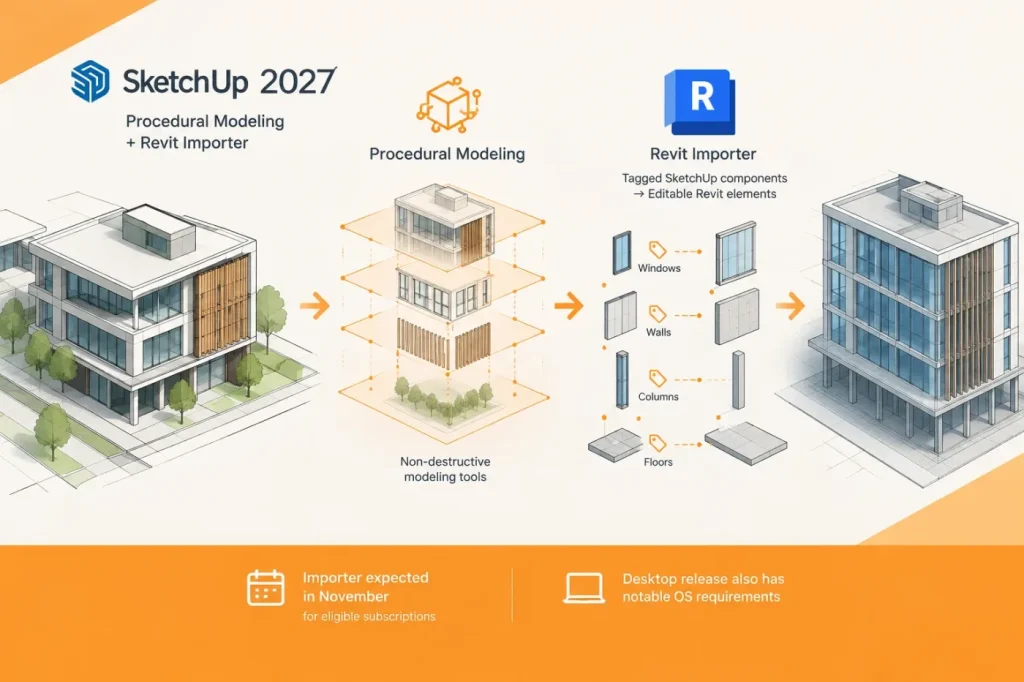

Trimble is pairing non-destructive modeling tools in SketchUp 2027 with a new route from conceptual models into Revit: the company’s November 10 announcement introduces SketchUp Importer for Revit, which maps SketchUp component tags and classes to Revit categories and converts them into native architectural elements. The practical goal is to carry more organized concept geometry into documentation without rebuilding it from scratch. Trimble cites Dodge Data & Analytics research estimating that up to 40 percent of design time in mid-to-late project phases is spent manually re-keying, re-modeling and cleaning up transferred geometry. The announcement does not detail how the importer handles inconsistent tags or classes, so the mapping still needs to be checked on a project’s actual components.
The importer is expected in November 2026 at no additional cost to Pro Advanced Workflows and Studio subscribers. Trimble says the resulting Revit elements can be edited, scheduled and documented. I would make a pilot handoff contingent on representative components mapping to their intended categories and becoming editable, schedulable and documentable native elements; any case that requires manual reclassification or rebuilding should fail that acceptance check.
Procedures target selected modeling operations
SketchUp 2027 introduces Procedures as a way to edit the output of certain operations without discarding the underlying work. The official release notes specify that Follow Me, selected Solid Tools and the new Copy Along tool can create native, editable procedural components. Copy Along distributes groups or components along a path while keeping the path, copies and parameters interactive. That makes the documented tools relevant to designs where a profile, solid operation or repeated component placement is likely to change during revision; it does not establish that every modeling operation can be revised procedurally.
The documented scope is specific: Procedures cover Follow Me, selected Solid Tools and Copy Along, not every SketchUp modeling action. I would consider them a reason to change a workflow only when its recurring revisions use one of those supported operations. For work outside that list, teams should not plan on Procedures eliminating rework; the decision rule is to match the operation being evaluated against the documented list before relying on the feature.
For documentation, Section Fill Hatch Patterns apply patterns to cut materials, helping distinguish materials such as brick, concrete and batt insulation while controlling drawing detail. LayOut’s Paperless Canvas allows 2D drafting at 1:1 without choosing a page size or drawing scale first. AutoFit Live Components automatically configure and size themselves to fit a selected surface. The Spatial Preview extension can show a live model in Apple Vision Pro while a Mac is used with Mac Virtual Display; Trimble says designers can change geometry or materials and see the result in the headset without exporting, uploading or reopening a viewer. These details point to different workflow uses: clearer section drawings, early-scale-independent drafting, surface-fitting components and live design review.
Check desktop requirements and availability
SketchUp 2027.0 is available for eligible Pro and higher-tier subscribers, with some capabilities also available to Go subscribers on iPad. The desktop requirements are a significant constraint for upgrade planning: Trimble’s SketchUp feature information says version 2027 requires Windows 11 on Windows and Apple silicon on Mac; Intel-based Mac users and Windows 10 users must stay on SketchUp 2026, according to that guidance.
Check hardware first, then workflow fit: desktop users must meet the stated operating-system and processor requirements. Eligible teams should then confirm that recurring revisions use Follow Me, selected Solid Tools or Copy Along before counting on Procedures to reduce rework. For the importer, check Pro Advanced Workflows or Studio subscription eligibility and apply the component-to-category and native-element pilot checks above.
Sources
- Trimble Expands Design and Constructability Workflows With New SketchUp Capabilities — Trimble
- SketchUp Desktop 2027.0 Release Notes — Trimble SketchUp Help Center
- SketchUp’s newest design tools — Trimble SketchUp