
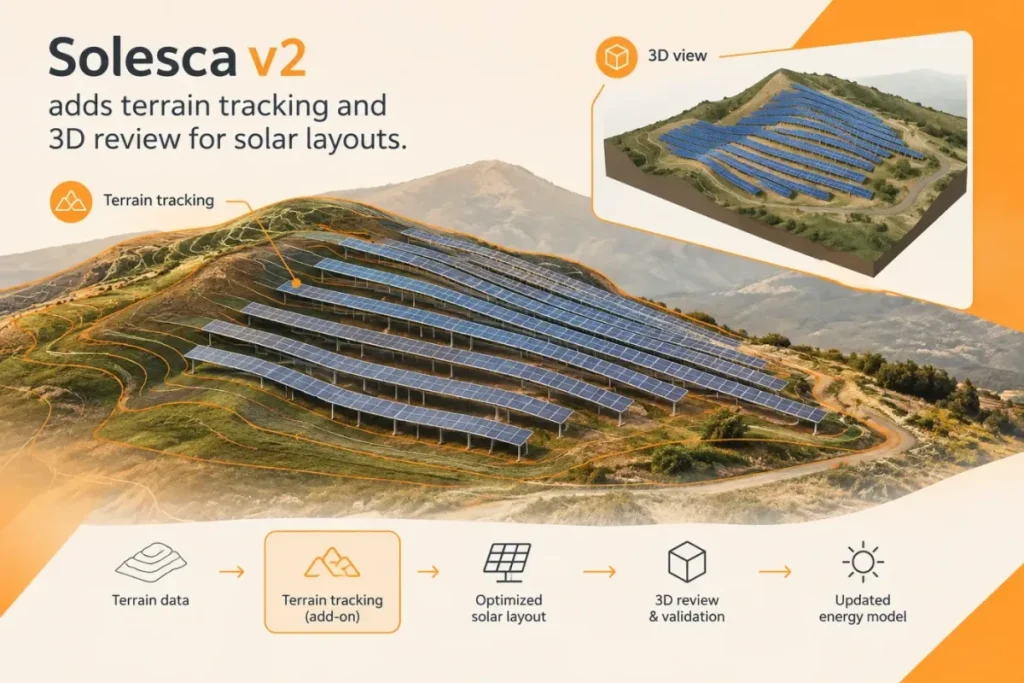

Solesca v2 adds terrain tracking for ground-mounted solar layouts, letting rows follow a site’s slope within configured racking limits, alongside 3D views for inspecting layouts and shadows. The company’s official v2 release notes also describe changes to energy modeling, deliverables and the design workflow.
The terrain feature shifts slope-aware layout work into early-stage project evaluation. Users can upgrade a ground-mount design to terrain tracking, inspect the resulting layout against site slope and racking constraints, and view pile reveals—support heights above ground—in 3D. Solesca says rows follow the ground; its documentation instructs users to review the result against slope, clearance and pile limits for the selected racking. Solesca says terrain work has traditionally been done in AutoCAD and positions v2 as bringing it into earlier site evaluation. That may help teams identify potential layout issues sooner, but it does not establish that a proposed design is buildable without further site and engineering checks.
The 3D view extends beyond terrain. Solesca describes inspecting rooftops, carports and ground mounts from different angles and changing the sun’s position to review shadows. For ground-mount work, pile-reveal coloring can help flag supports with greater exposed height. The release also adds 3D DXF exports and a pile-reveal package, giving teams ways to share aspects of the modeled layout beyond the editor.
Terrain tracking requires an add-on license and switches terrain designs to Solesca Pro for energy modeling. For teams comparing production estimates, a flat-versus-terrain comparison can therefore mix a change in geometry with a change in model path: terrain designs use Solesca Pro, and Solesca’s documentation lists SolarFarmer as unavailable for them. The model selector and access available to a user can also affect which simulation options appear. Results should be recalculated after conversion rather than carried over as if the geometry were unchanged.
Existing v1 designs open with their saved layout and results in view-only mode. Users can review an upgrade comparison before converting a design; the v1 snapshot remains available afterward. Solesca cautions that changes to layout, equipment, inverter groups and modeling can alter results, and recommends running the model again before using production figures. The company also says there is no downgrade control for terrain conversion. I would keep a separate editable flat-design baseline before converting if later edits to that design matter: v1 opens in view-only mode, and there is no downgrade control. The saved v1 snapshot can support comparison, but it is view-only.
Terrain tracking is best treated as an early screening tool for slope-related layout and pile-height concerns, not as verification of survey data or buildability. For a production comparison, I would hold the energy model constant where possible. If conversion requires a model change—for example, because terrain designs use Solesca Pro or SolarFarmer is unavailable—I would flag the comparison as confounded and would not attribute a difference in production estimates to terrain alone. Solesca’s guidance also says to review terrain against map and site information and notes that a display adjustment is not a replacement for checking elevations. Before relying on the result, I would check the add-on’s availability, the selected racking limits, the resulting pile reveals and the energy model used after conversion.
Sources
- Solesca v2 release notes — Solesca
- Terrain tracking — Solesca
- Coming from v1 — Solesca
- Model energy — Solesca