
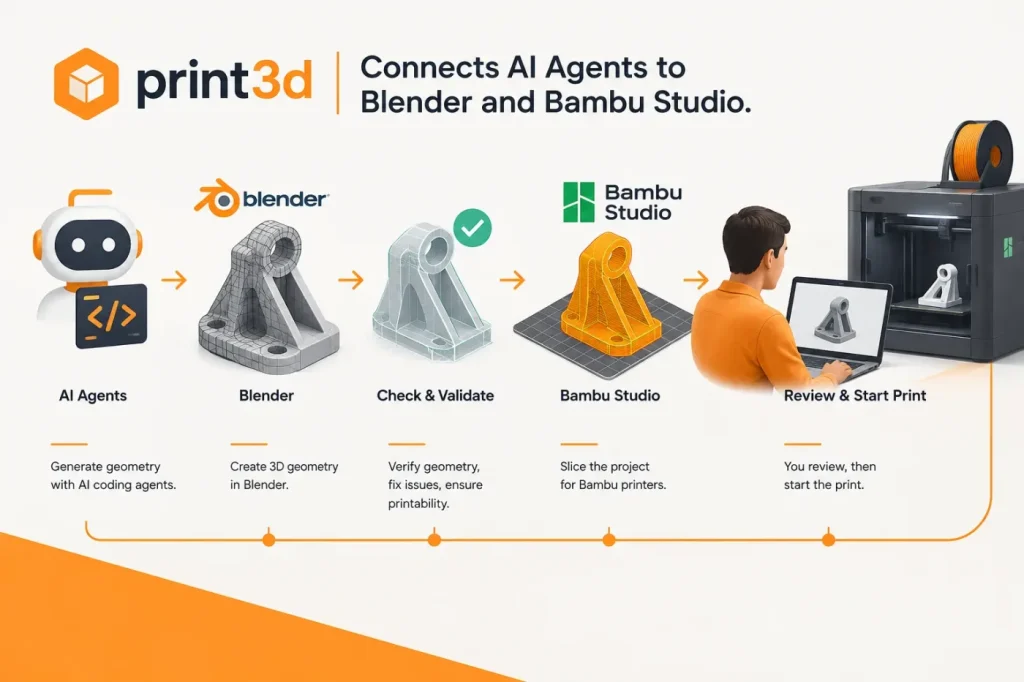

print3d v0.1.0 connects AI coding agents to a workflow that turns a part description, reference photo or shop listing into a sliced Bambu Studio project. The open-source tool generates geometry through a Blender script, checks the result, then hands the project to the user; it does not send jobs to a printer or start a print.
The developer’s release describes the workflow for the Bambu Lab X2D. print3d runs the agent-written script in Blender, performs printability checks, and can return issues—such as geometry that needs revision—to the agent for another pass. When checks pass, the project reports estimated print time, material use and layer count. A browser-based 3D view lets users rotate the part before handoff.
My view is that this is the release’s most consequential feature because it can catch some geometry and print-preparation problems before a user opens the result in the slicer. For a replacement part, my decision rule would be to reject it if any critical dimension does not match the original; passing printability checks alone does not establish dimensional fit or prove that a part will perform safely under load. I would treat a generated replacement as a design proposal, not a proven substitute for a functional component.
Because the agent-generated Blender script runs locally, I would review it before allowing local execution. A generated script could access credentials or write files outside the project directory. If I could not rule out those operations by reviewing the script, I would run it in a sandbox without secrets rather than allow unrestricted local execution. The release says the Hermes server is marked untrusted and prompts before tools that run scripts or write files, but that prompt does not replace reviewing what the generated script will do.
The release packages the workflow as an MCP server and an installable Hermes Agent plugin, with setup instructions for Claude Code, Codex, Cursor and Gemini CLI. It requires Blender, Bambu Studio and uv.
In the handoff, print3d produces an X2D-oriented Bambu Studio project with print estimates and a browser-based 3D view; the user can review the part and then continue in the slicer. The workflow ends there: the user starts the print manually. Users should check dimensions, clearances, orientation and intended use in the project before relying on the result.
Sources
- print3d v0.1.0 release — GitHub
- print3d repository and documentation — GitHub